Whenever you attempt to crack anything, you need to know the vectors. In the case of YouTube stream keys, we need to know what characters are being used.
To do this, click on the "Go Live" and you will be greeted with this screen.
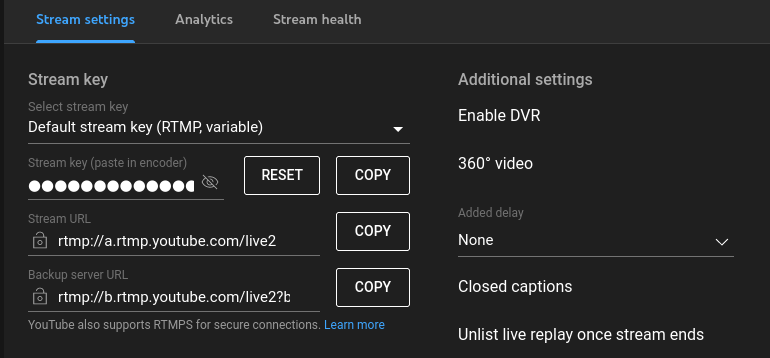 Open a notepad and click "COPY". Paste it into the notepad. Go back to the YT page and click "RESET" and "COPY" again, and paste in the notepad. Repeat a few times.
Eventually, you'll have enough samples to make an informed guess as to which characters to use.
Open a notepad and click "COPY". Paste it into the notepad. Go back to the YT page and click "RESET" and "COPY" again, and paste in the notepad. Repeat a few times.
Eventually, you'll have enough samples to make an informed guess as to which characters to use.
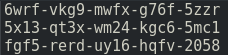 From this, we can see that YT stream keys use lower case alphanumericals (0-9 and a-z) 20 of them in total, broken into sets of 4 separated with hyphens. This gives us the total amount of possible combinations to work from which, in this case, is calculated as 36 (maximum different symbols) to the power of 20, which totals to 13,367,494,538,843,734,067,838,845,976,576 possible combinations (may seem like a lot, it's not).
Next, we need to create the wordlist of combinations. There already exists an application that makes this easy to do called "Crunch" which is available from various online sites, however, I would recommend the Github site and compiling it yourself if you can. You can download
the source here https://github.com/jim3ma/crunch You don't need to download the full repository - only the crunch.c is really needed.
Using crunch for the first time can be quite intimidating.
Firstly, it relies on console commands. If you are a windows user who is not used to it - you can always write a small batch file to execute from the same folder as your crunch executable. This is easily done by copying the command into notepad and saving in the same folder as the crunch executable as something like "run.bat" (the ".bat" suffix is needed) then double clicking on it to run.
Secondly, crunch has many commands that are not intuitive. There are many documents and examples online to demonstrate how to use it - and I will do my best to cover what you need here as many online tutorials don't cover some of the aspects used here very well.
Thirdly, there are a few methods you could employ to create the table - depending on your skill level. You don't NEED to generate all combinations.
The command used to generate ALL these combinations is;
From this, we can see that YT stream keys use lower case alphanumericals (0-9 and a-z) 20 of them in total, broken into sets of 4 separated with hyphens. This gives us the total amount of possible combinations to work from which, in this case, is calculated as 36 (maximum different symbols) to the power of 20, which totals to 13,367,494,538,843,734,067,838,845,976,576 possible combinations (may seem like a lot, it's not).
Next, we need to create the wordlist of combinations. There already exists an application that makes this easy to do called "Crunch" which is available from various online sites, however, I would recommend the Github site and compiling it yourself if you can. You can download
the source here https://github.com/jim3ma/crunch You don't need to download the full repository - only the crunch.c is really needed.
Using crunch for the first time can be quite intimidating.
Firstly, it relies on console commands. If you are a windows user who is not used to it - you can always write a small batch file to execute from the same folder as your crunch executable. This is easily done by copying the command into notepad and saving in the same folder as the crunch executable as something like "run.bat" (the ".bat" suffix is needed) then double clicking on it to run.
Secondly, crunch has many commands that are not intuitive. There are many documents and examples online to demonstrate how to use it - and I will do my best to cover what you need here as many online tutorials don't cover some of the aspects used here very well.
Thirdly, there are a few methods you could employ to create the table - depending on your skill level. You don't NEED to generate all combinations.
The command used to generate ALL these combinations is;
crunch 24 24 -f "charset.lst" lalpha-numeric -t @@@@-@@@@-@@@@-@@@@-@@@@
There are 20 symbols seperated with hyphens (of which there is 4) totalling 24 character spaces. The first "24" is minimum length, the next is maximum.
The -f points to a config file that lets use write "lalpha-numeric" which means all lowercase letters a through z, and numerical 0-9.
The -t is the pattern where the @ symbol is used to tell Crunch "We want to use the generator here" and the - symbol is, obviously, the seperating hyphens.
At this point, you could pipe the results to a routine such as OpenRTMP which will handle the connection to YouTube (the server is listed in the YouTube image where we got the generated stream keys), using the output from crunch as the password and selecting your own video file as the input.
This method, while 100% working, will obviously take way too long. Thus we need to optimise the attack itself. This can be done using various methods which is still within most peoples ability level to do. Let's cover a few of these now
First, and most obvious, is we can reasonably assume there will be NO repetition of the same symbol 4 times. Crunch has a built-in way for us to generate the wordlist in this way. The command for this is "-d 3@" which means "No repeating symbols longer than 3", thus our command now looks like this;
crunch 24 24 -f "charset.lst" lalpha-numeric -t @@@@-@@@@-@@@@-@@@@-@@@@ -d 3@
You will notice the output has dropped by a lot, from crunchs output.
 Has now decreased to
 At this point, it is worth noting that crunch is quite possibly having trouble calculating such a large dataset, so it's possibly best to ignore whatever it's assuming on the PetaBytes. However, common sense tells us that there is less for it to calculate, ergo quicker.
My previous generated keys have shown us that there is a repetition of 2 characters, however, my sample set is only 3 for this example. I HAVE seen stream keys of 3 repeating symbols which is why I would assert it's best. Of course, you can use "-d 2@" if you want to reduce time - at the sake of missing a load of potential valid keys.
Another major advantage we can use is multiple instances. Crunch can be told where to start and end generating. You could open four consoles. We know there is 36 symbols, divide by 4 (how many instances we are running) is 9 - so the first console would work from 0-9, the next a-i, j-r and s-z combinations. This would be useful to speed up the process, but would mean the computer would be dedicated to just this task and not be useful for much else. This is something you should consider if you have access to multiple systems, thus spreading the workload. If you have access to Arduino or Raspberry PI, you could run dedicated systems for this alone (which would be more preferable).
My personal preferences when it comes to pure blind brute forcing, is to use pre-generated wordlists. This I will cover later on as the method I employ is beyond the scope of most users. Furthermore, I implement a method I call "Wild Brute Force" which is not used here (seeding the wordlist to start in a "random" place, and wraps), yet is vastly more effective than standard brute force. Something you can also do with crunch. Obviously disk space is the issue here, and crunch has us covered on this. Using the command;
At this point, it is worth noting that crunch is quite possibly having trouble calculating such a large dataset, so it's possibly best to ignore whatever it's assuming on the PetaBytes. However, common sense tells us that there is less for it to calculate, ergo quicker.
My previous generated keys have shown us that there is a repetition of 2 characters, however, my sample set is only 3 for this example. I HAVE seen stream keys of 3 repeating symbols which is why I would assert it's best. Of course, you can use "-d 2@" if you want to reduce time - at the sake of missing a load of potential valid keys.
Another major advantage we can use is multiple instances. Crunch can be told where to start and end generating. You could open four consoles. We know there is 36 symbols, divide by 4 (how many instances we are running) is 9 - so the first console would work from 0-9, the next a-i, j-r and s-z combinations. This would be useful to speed up the process, but would mean the computer would be dedicated to just this task and not be useful for much else. This is something you should consider if you have access to multiple systems, thus spreading the workload. If you have access to Arduino or Raspberry PI, you could run dedicated systems for this alone (which would be more preferable).
My personal preferences when it comes to pure blind brute forcing, is to use pre-generated wordlists. This I will cover later on as the method I employ is beyond the scope of most users. Furthermore, I implement a method I call "Wild Brute Force" which is not used here (seeding the wordlist to start in a "random" place, and wraps), yet is vastly more effective than standard brute force. Something you can also do with crunch. Obviously disk space is the issue here, and crunch has us covered on this. Using the command;
crunch 24 24 -f "charset.lst" lalpha-numeric -t @@@@-@@@@-@@@@-@@@@-@@@@ -d 3@ -o START -z 7z -b 1Gb
The "-b 1Gb" option tells crunch to generate seperate files of 1Gb in filesize, the "-z 7z" tells crunch to compress each generated file with 7zip (which you need to have installed - and if you don't, why not ?). The "-o START" is required for this, and gives us the bonus of being able to break & restart from that point of generation. Although crunch allows people to use GZIP and other compression methods, 7zip is the best for text files which is what we are generating. If you are savvy enough to compile your own crunch, I would also advise adding some lines of code around line 1500 for your own compression methods (Matt Mahoney has written many advanced compression methods and I would recommend his SR2 for a good balance between speed and output). If that is beyond your scope, 7zip is still a very good option. Although compression is slow, decompression is fast.
The above example would give us a 1Gb file called "aaab-aaab-aaab-aaab-aaab-aaab-aaab-aaab-aaay-3m46.txt" which is, obviously, 1Gb in filesize. After it's run through 7zip, the filesize is reduced to 10.9Mb - which is a HUGE space saving. Then it would continue to generate the other files. HOWEVER, crunch is not very good at removing the original 1Gb file, thus you would need to clean those files as they are now not needed - we have a smaller file to replace it. This is the ONLY flaw i've seen in crunch, and is a very minor issue to me. This is where the breaking of generation & restarting can be of use, giving you time to delete unwanted files and continue where crunch left off.
Now we get into the more advanced stages of an attack. THIS is the method I would employ, despite being more technical based.
We have a pattern of xxxx-xxxx-xxxx-xxxx-xxxx where the first group of xxxx is repeated eventually in the 2nd to 5th positions. That is to say, we only really need to concentrate on the first 4 symbols, create THAT wordlist, then we can use 5 pointers that reference the table using a small piece of code. If this means little to you, please read on and all shall become clear. The command I would use is;
crunch 4 4 -f "charset.lst" lalpha-numeric -t @@@@ -d 3@
The output, if placed into a file, would be 8Mb and take seconds to generate. THIS is all we essentially need. In fact, at this point using crunch is overkill as it's a VERY simple thing to code in any language. For the sake of speed, I prefer to use this 8Mb wordlist as the whole thing can be loaded into memory and used as a lookup table.
The output from crunch, loaded into a hex editor, looks like this;
 Notice that crunch appends "0A" (ASCII line feed) to each entry, as wordlists tend to require the linefeed to terminate that line as described in this table.
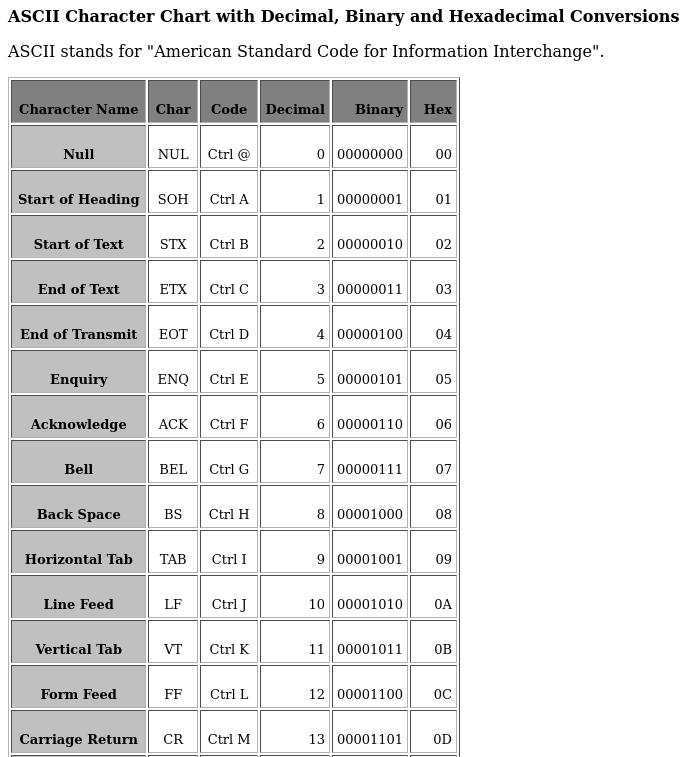 This is something to be aware of if you are using this table directly. My preference would be to remove these. In fact, I would use my own generator to create the table so all entries are 4 bytes instead of 5. This is a minor point and merely a preference.
I will give examples in pseudocode - if you are not a coder, you may want to stick to the earlier mentioned method. However, I hope this explanation makes sense to you.
We will name the generated wordlist in memory "wl_lookup". The next step is to find how many total entries there is, which can vary depending how many symbol repetitions you set, eg: "wl_max_entries = size of (wl_lookup) / 4". If you ARE using the crunch output, then you divide by 5.
The next step is to assign 5 pointers which, for this example, we will label "wl_entry1" through "wl_entry5".
A simple way to cycle through all options would be nesting the loop, done akin to the following pseudo code for incrementing all combinations;
This is something to be aware of if you are using this table directly. My preference would be to remove these. In fact, I would use my own generator to create the table so all entries are 4 bytes instead of 5. This is a minor point and merely a preference.
I will give examples in pseudocode - if you are not a coder, you may want to stick to the earlier mentioned method. However, I hope this explanation makes sense to you.
We will name the generated wordlist in memory "wl_lookup". The next step is to find how many total entries there is, which can vary depending how many symbol repetitions you set, eg: "wl_max_entries = size of (wl_lookup) / 4". If you ARE using the crunch output, then you divide by 5.
The next step is to assign 5 pointers which, for this example, we will label "wl_entry1" through "wl_entry5".
A simple way to cycle through all options would be nesting the loop, done akin to the following pseudo code for incrementing all combinations;
wl_entry1 = wl_entry1 + 1
if wl_entry1 = wl_max_entries then wl_entry1 = 0, wl_entry2 = wl_entry2 + 1
if wl_entry2 = wl_max_entries then wl_entry2 = 0, wl_entry3 = wl_entry3 + 1
if wl_entry3 = wl_max_entries then wl_entry3 = 0, wl_entry4 = wl_entry4 + 1
if wl_entry4 = wl_max_entries then wl_entry4 = 0, wl_entry5 = wl_entry5 + 1
if wl_entry5 = wl_max_entries then goto all_combinations_done
Such a routine would take a few cycles to run, thus faster than generating the full wordlist we need, taking up less memory. Something easily implementable on even a Raspberry Pi Pico or mobile device.
To create the output, you would merely grab the 4 characters from the lookup table (remembering to multiply by 4 or 5 if you use the raw crunch output) using psedo code akin to;
wl_output = "" (we need to zero this)
wl_output = 4 bytes from wl_lookup[(wl_entry1 * 4 (or 5, depending on your table))]
wl_output = wl_output + "-" (the seperating character)
wl_output = 4 bytes from wl_lookup[(wl_entry2 * 4)]
wl_output = wl_output + "-"
wl_output = 4 bytes from wl_lookup[(wl_entry3 * 4)]
wl_output = wl_output + "-"
wl_output = 4 bytes from wl_lookup[(wl_entry4 * 4)]
wl_output = wl_output + "-"
wl_output = 4 bytes from wl_lookup[(wl_entry5 * 4)]
At this point, wl_output is our current output we need pipe to OpenRTMP routine.
If you are at this point, and able to create the above routine, you could easily insert your own code into the OpenRTMP itself and have it log all "successful" connections into a file by saving the 5 indexes (wl_lookup1 through wl_lookup5) each entry needing only 3 bytes each (you don't need to store the high byte of the DWORD as it will always be NULL), you have already decreased the log file by a quarter of the size of the actual crunch wordlist itself, all entries have been found to be "live" or valid.
Lastly, despite this tutorial is aimed at one of the most corrupt corporations - you can modify it easily enough to work for other streaming platforms such as Twitch merely by repeating the "key generation" step, and adjusting the parameters accordingly. I've explained steps enough for most to follow so you can adapt this. I consider this one of the most inherent security flaws online which is easily exploitable without needing to use any invasive code.
If you are editing your own code, you may want to use multithreading. If you are of the more cautious types, adding in rotating proxies would also be useful. I do NOT advise the use of VPNs as they are honeypots and should NEVER be trusted as secure.
Enjoy and Hail Chaos.
The_Original_Sin